A Stack for Every Customer: Inside the New Computle Platform
We have rebuilt the Computle platform so that every customer runs on their own isolated stack, with its own database, keys, certificates and backups, built from code and placed near them. This is how it works.

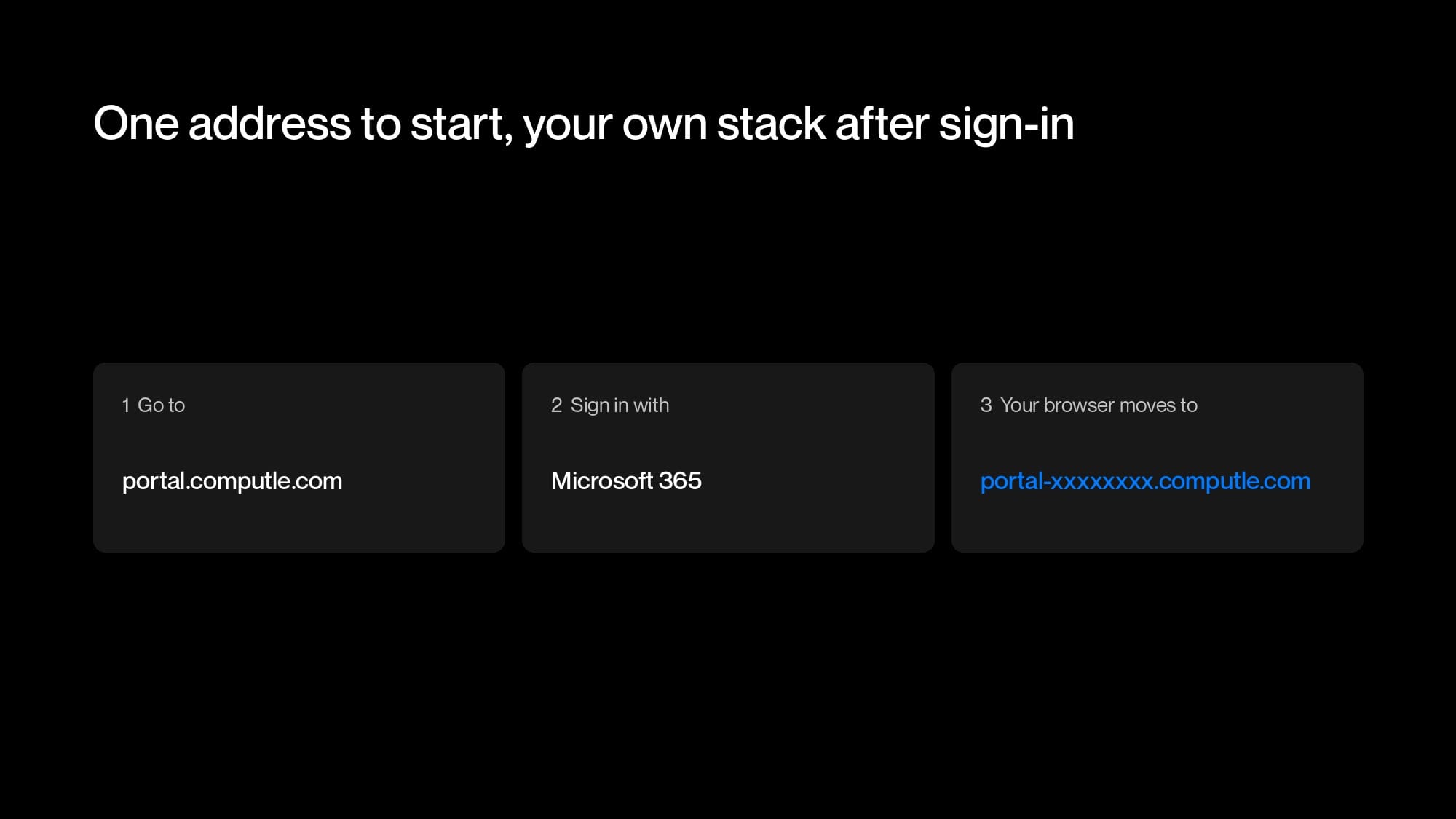
Over the coming weeks we are moving every Computle customer to the second generation of our platform. The only change you will see is in your browser: after you sign in at portal.computle.com, the address changes to one that belongs to your practice, for example portal-7c2e91ab.computle.com.
Behind that, each customer now gets their own complete copy of the platform, which we call a stack. This post covers why we made the change, how a stack is built, how customers are kept apart, and how changes reach production.
Why we rebuilt it
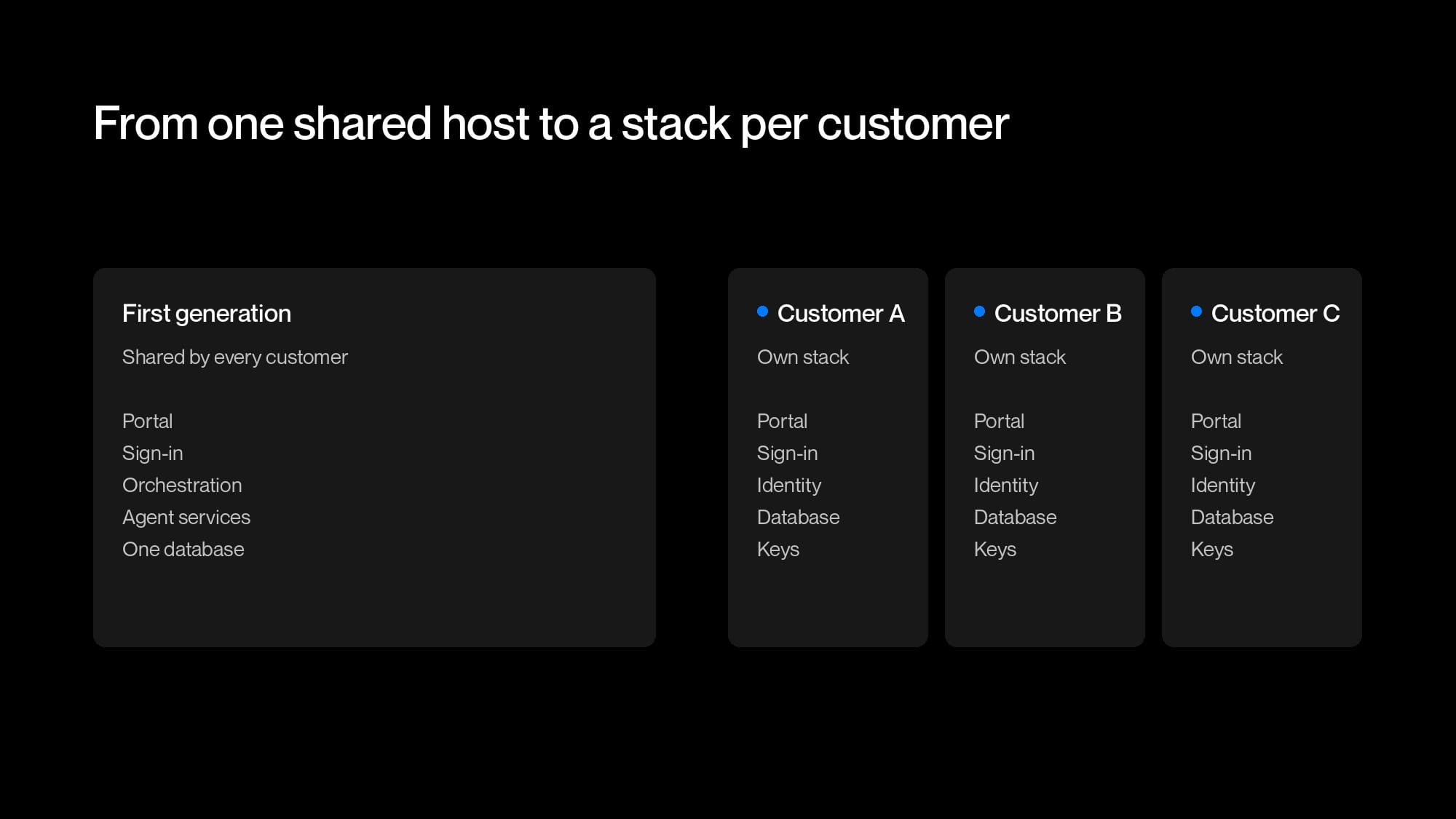
The first generation of the platform was a set of Docker containers running on a single host: the portal (Node.js and Express), sign-in, orchestration, and the services our workstation agents report to, all sharing one MongoDB database. Every customer used the same containers and the same database.
That worked well with a handful of customers. As we added more, three things pushed us to change it.
Performance
- Every customer's portal traffic, agent check-ins, patch runs and telemetry went through the same services and database.
- Response times crept up as the customer count grew.
- A busy period for one customer was felt by all of them.
- The only fix was a bigger host, which meant a bigger single point of failure.
Releasing changes
- Every release went to every customer at the same moment.
- Giving one customer a change first needed a per-customer feature flag in the shared code.
- Flags pile up, every customer runs every flagged branch, and removing them later is work of its own.
Security hardening
- Every service shared one host, one network and one database.
- A weakness in any one service would sit next to every customer's data, giving an attacker room to move sideways.
- We wanted a design where getting into one part of the platform reaches one customer and nothing further.
With a stack per customer
- A customer's load only affects their own stack.
- A new version can go to one customer first, then roll out to the rest.
- Each stack has its own container, database, keys and certificates, so there is no shared path from one customer to another.
What is in a stack
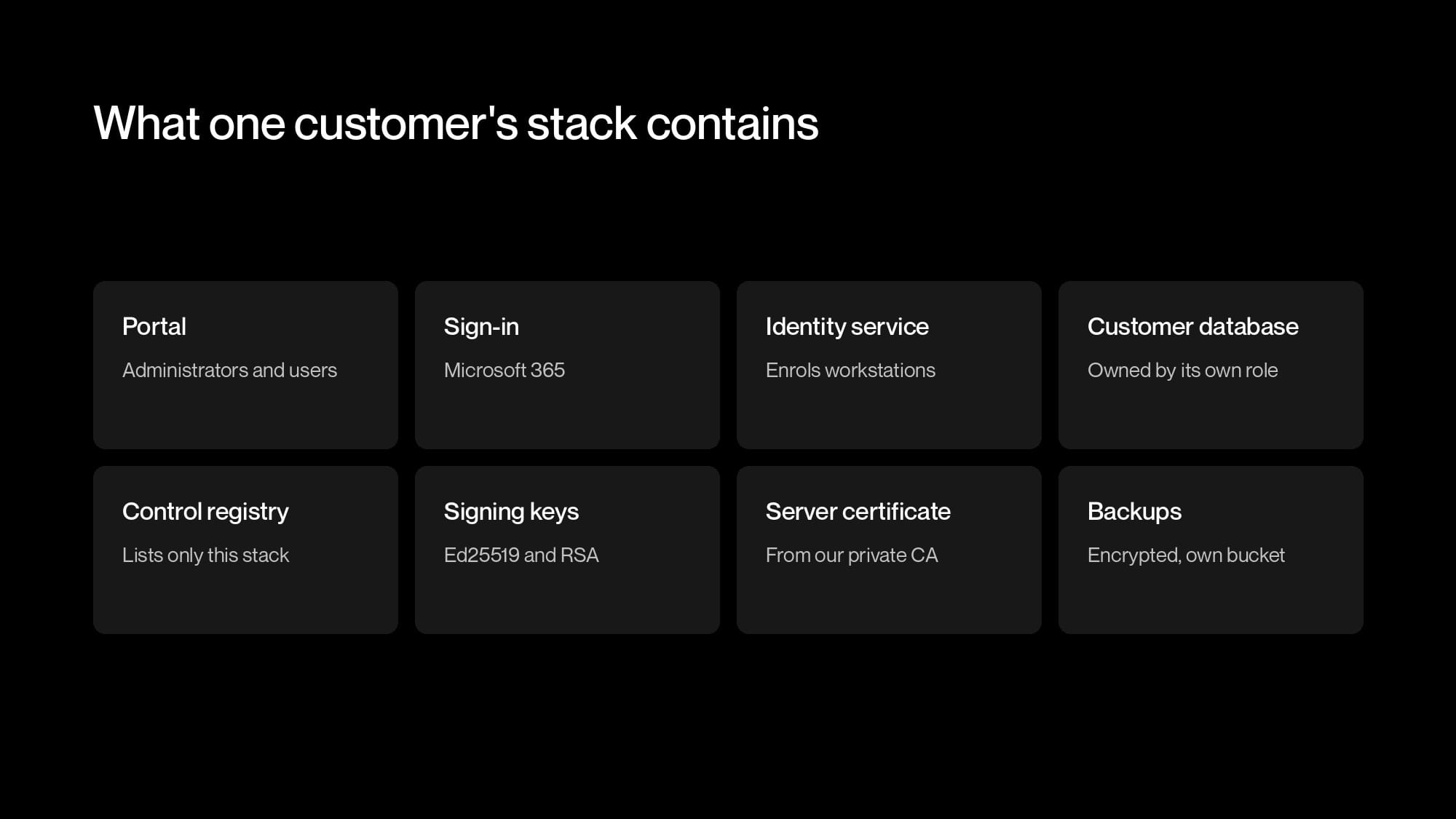
A stack is one customer's complete platform. Each one runs in its own Proxmox LXC container, with its services managed by systemd. It contains:
- The portal, and a sign-in service connected to the customer's Microsoft 365 tenant.
- An identity service, written in Go, which enrols workstations, issues their machine certificates and signs the tokens that let a session start.
- Two PostgreSQL databases: a customer database, owned by a database role created for that stack, and a control registry with a single entry for the stack itself. No other role can connect to either.
- Two signing keys created for that stack: an Ed25519 key for access grants and an RSA key for session tokens (RS256).
- A server certificate for the stack's name, issued by our private certificate authority, which runs on Smallstep step-ca.
- Backups, kept in an object storage bucket that belongs to the stack.
The stack connects to PostgreSQL without a password. The database verifies the stack's client certificate and maps it to that customer's role.
Licences
- Every customer runs the same code. Remote access, patching and software deployment are modules, turned on by the customer's licence.
- Licences are signed centrally with a key no stack has, so a stack can check its licence but cannot create or extend one.
- A licence change reaches the running stack without a rebuild or restart.
Shared services
- Rendezvous introduces a device to a workstation when a session starts.
- Relays carry a session when there is no direct path.
- Neither stores customer data, and both check every party's certificate.
Security
Security was one of the three reasons for the rebuild. In the first generation every customer's data sat on one host, in one database, behind the same services, so a weakness in any one of them was a step away from everyone. The new platform puts layers between customers, from the outside in.
Their own container
- Each customer's stack runs in its own Proxmox LXC container, with its own PostgreSQL databases.
- No process, filesystem or database is shared with another customer, so there is nothing to move sideways through.
Their own keys and certificates
- Each stack has its own signing keys and server certificate. A key or certificate taken from one stack works nowhere else.
- Stacks log in to PostgreSQL with a client certificate, not a password. Each database is owned by its stack's role, with
REVOKE CONNECT ... FROM PUBLIC.
A stack only serves its own customer
- Each stack is locked to one customer ID at start-up. A request naming any other customer is refused with
tenant_not_served_herebefore any lookup. - Its control registry lists only itself, so there are no other customers' credentials to find.
Permissions on every route
- Services talk to each other over mutual TLS, but a certificate only proves who is calling.
- Every route also needs a role, taken from an exact list of certificate names per stack. There are no wildcards and no allow-all setting.
It fails closed
- A stack will not start without its keys, its certificate authority files or its caller list, and it will not make a replacement key.
- In Go, an empty certificate pool falls back to the system's public roots, so the service checks for that and refuses to start.
Backups a stolen server cannot read
- Backups are encrypted to a certificate whose private half never touches a stack. More on that below.
Have a go yourself:
Try to break in
Select a scenario to compare what it could reach in each design. Each square represents one customer.
Routing
Workstations, apps and browsers reach their stack through a shared edge, a layer 4 proxy:
- It reads the server name (SNI) from the start of the TLS handshake.
- It passes the connection, still encrypted, to the stack with that name.
- It has no keys or certificates and cannot read the traffic.
- Each stack terminates its own TLS. The portal gets its public certificate through ACME with the TLS-ALPN-01 challenge, answered by the stack itself.
- These names are not proxied through a CDN, because a CDN would have to terminate TLS.
The proxy's routing map is generated by the same code that builds the stacks, one line per stack.
Before choosing a certificate design we tested both, by deliberately sending a customer's connection to the wrong stack. Try the same test:
Send a connection
The edge routes on the server name and never decrypts. Choose a certificate design, then send a connection for Stack B to the right stack or the wrong one.
So every stack has its own certificate.
DNS
- Stacks sit under one wildcard DNS record with random labels. There are no per-customer records, so our DNS zone does not list our customers.
- No address includes a practice name or account identifier.
- DNS is not used for security. Every connection is checked against our private certificate authority for the exact identity the client expects, so a hijacked DNS record, a rogue proxy or a valid public certificate for one of our names would all fail.
Signing in
You still go to portal.computle.com and sign in with Microsoft 365. Once you have signed in, the platform looks up which customer you belong to and redirects your browser to your stack. Nothing that identifies a customer is visible before sign-in.
Your stack's address
portal-followed by eight random hexadecimal characters, undercomputle.com.- Generated randomly and checked to be unique across every stack.
- Not based on your customer identifier, a UUID that stays internal and is what your certificates and licence are tied to.
Microsoft 365 sign-in is unchanged. The Entra ID application registration, consent and user accounts stay the same, so nobody signs in again or re-approves anything.
Building a stack
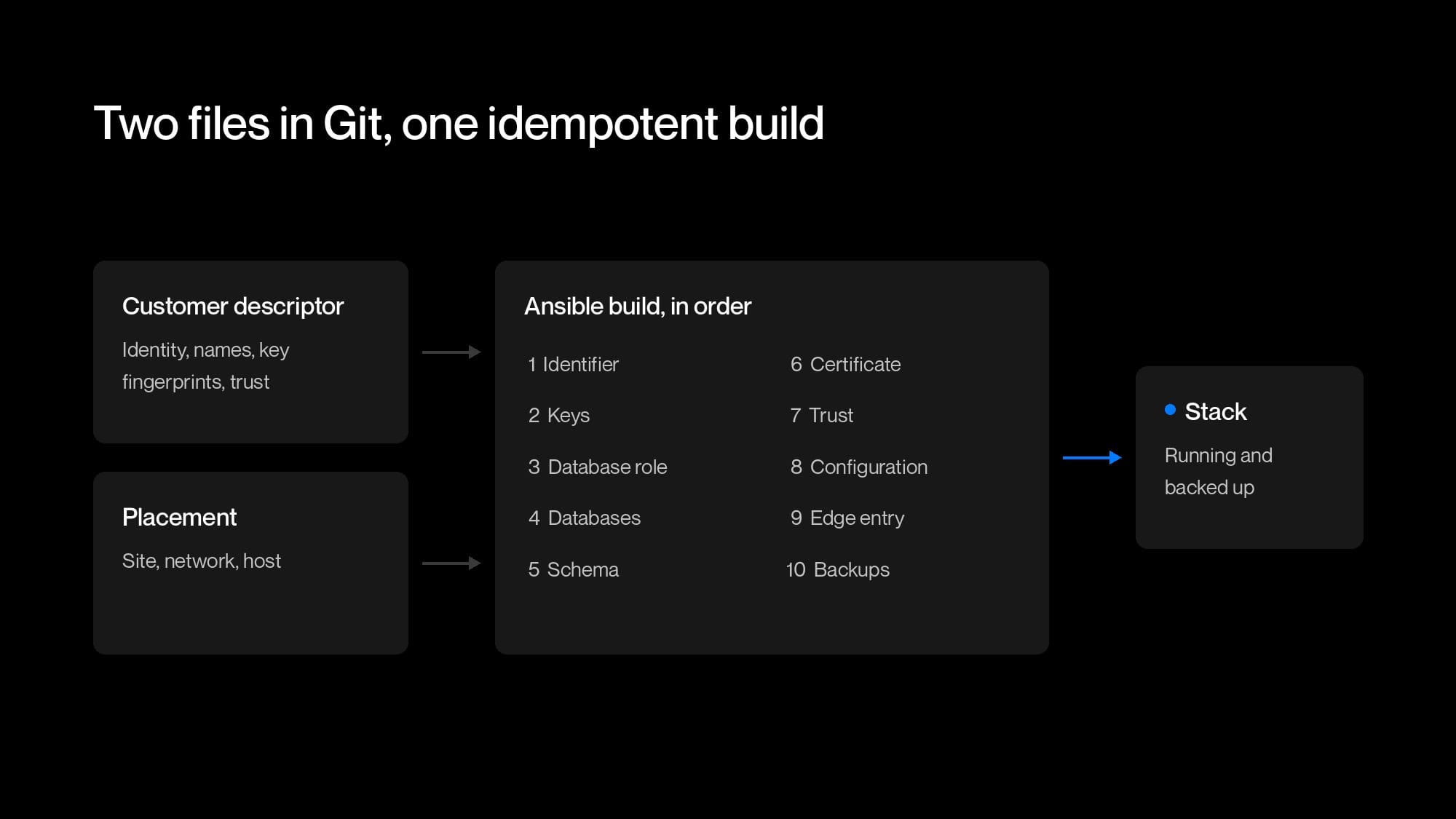
Stacks are built entirely by Ansible, from two files in Git:
- A customer descriptor, holding the customer's internal identifier, their name under the wildcard, their databases, the public fingerprints of their keys and the certificate authorities they trust. It contains no secrets.
- A placement, holding where the stack runs: the site, network and Proxmox node.
A trimmed descriptor looks like this:
TENANT_NAME=example
TENANT_DISPLAY_NAME="Example Firm"
TENANT_ID=<uuid, minted on first build>
TENANT_PLACEMENT=<site>-stack
TENANT_DB_MODE=clientcert
TENANT_GRANT_KEY_SPKI_SHA256=<written back after the key is created>
TENANT_ISSUER_KEY_SPKI_SHA256=<written back after the key is created>
TENANT_BACKUP_MAX_AGE_HOURS=26
Keeping the descriptor and placement separate means a customer can move sites without anything about their identity changing. A Go test, TestTenantFactsDoNotDependOnPlacement, moves a customer between two placements that differ in every field and checks that the endpoint, certificate subject, issuer, key ID, database names and role are byte-for-byte the same afterwards. Moving a stack to a new site uses the same process as building it in the first place.
The build
- Runs in a fixed order: identifier, keys, database role, databases, schema, certificate, trust, configuration, proxy entry, backups, then the service.
- Is idempotent, so running it again produces the same stack.
- Supports
--check, which shows what would change without changing it. - Deploys code and configuration as separately tagged steps, so rolling back one does not roll back the other.
Every build also follows these rules:
- Anything the build generates, such as a key or database password, is saved to our key vault (OpenBao) and read back before it is used. If a build is interrupted, the secret is either stored safely or was never created.
- The build compares what it holds with the key vault and stops if anything differs, so a rebuild cannot rotate a key by accident. Key rotation is a separate, deliberate procedure.
- The build works in a private
mktempdirectory with mode 0700, removed by a shell trap when it finishes, fails or is interrupted. Nothing is left on the machine that ran it.
Database migrations
- Each one is logged in a
schema_migrationstable with a checksum, so a migration edited after it ran is reported. - Each stack applies its own migrations as its own database role.
- A dry run happens inside a transaction that is rolled back.
- The stack checks its schema before it opens its listener.
Backups
Where they go
- Each stack backs itself up every night, on a systemd timer, to its own object storage bucket.
- The stack's storage credential only works for that bucket.
- Retention and bucket lock are set with a separate credential the stack does not have.
What is in them
- A
pg_dumpof each of the stack's databases (neverpg_dumpall), plus its keys, certificates and configuration. - Encrypted as CMS enveloped data with AES-256 to a recipient certificate. The stack only has the public half.
- Someone who stole a stack's server could not read any of its backups, including the ones that server wrote. Computle keeps the private half separately, never on a stack.
- A plaintext manifest beside each archive holds no secrets: time, schema version, row counts, the archive's SHA-256 and the public key fingerprints. Backup checks read only the manifest.
When they are checked
- A new stack takes its first backup during the build, through the same systemd unit the timer runs.
- The build fails without a backup less than 26 hours old, so no customer goes live without one.
- Restores are tested, and a restored stack is checked against the key fingerprints in Git.
How a change ships
All changes to the platform go through the same steps.
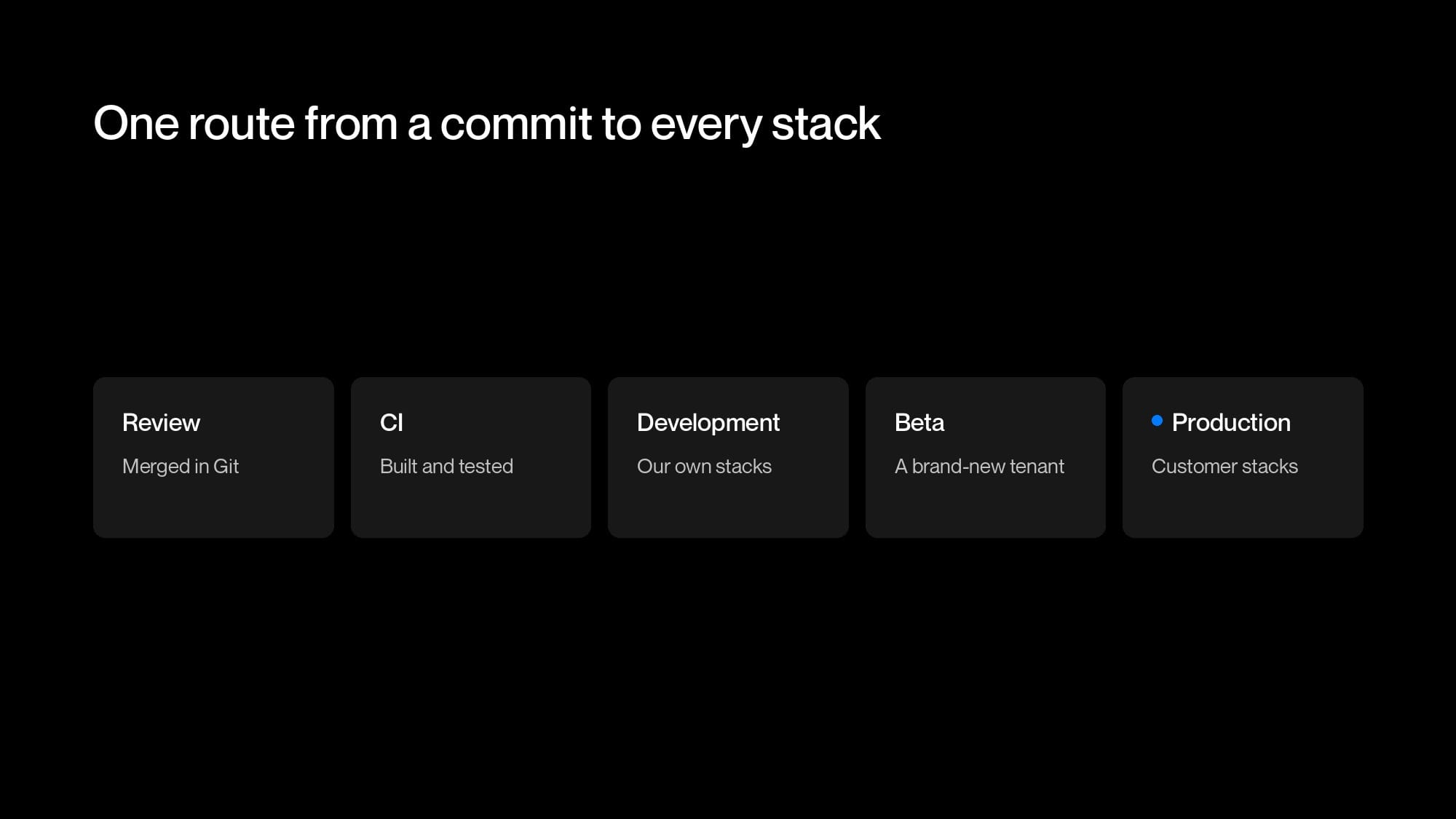
- Review: the change is reviewed and merged in Git, so there is a record of who changed what and why.
- CI: GitHub Actions builds the change and runs the automated tests.
- Development: the change is deployed to our development stacks.
- Beta: the change is deployed to a beta environment set up as a brand-new customer, with its own rendezvous and relay. This catches anything that only works on a stack that has been running for months. No customers run on beta.
- Production: the change is rolled out one stack at a time. Ansible runs with
serial: 1andany_errors_fatal, so a problem on one stack halts the rollout before it reaches the next.
Because each customer has their own stack, we can also deploy a new version to a single customer first. That replaces most of the per-customer feature flags the old platform needed.
Every stack is built from the same code, so we can check any stack against that code at any time. If a stack has drifted, we fix it in code and rebuild.
Placement
- Stacks are not tied to a particular host or site.
- Each one is built at the Computle site nearest the customer and their workstations, shortening the path for the portal, sign-in and agent check-ins.
- If a site has a problem, only the stacks there are affected, and any of them can be rebuilt elsewhere from Git and restored from backup.
| Event | First generation | A stack per customer |
|---|---|---|
| One customer is busy | Every customer shares the slowdown. | Only that customer's stack is busier. |
| Testing a change with one customer | A feature flag in the shared code. | Deploy the new version to that customer's stack. |
| Host fails | Every customer loses the portal and management services. | Only the stacks on that host are affected. Each is rebuilt from Git and restored from its own backup. |
| A faulty release | Reaches every customer at once. | Caught at beta, then rolled out one stack at a time. |
| A credential is stolen | Shared credentials work for every customer. | Each stack's keys and credentials only work for that stack. |
| A server is stolen | It holds every customer's data. | It holds one customer's data and cannot decrypt its own backups. |
What comes next
When a single stack's resources become the limit, we will move to cells: a set of identical stacks, each hosting several customers in separate slots. A customer's identity does not depend on where they are placed, so cells need no changes to routing or to how trust works. A cell is just another type of placement.
What you need to do
Most practices do not need to do anything. Keep using portal.computle.com and your browser will move to your own address after sign-in. Bookmarks, email links and the Computle apps keep working, and workstations move to their new stack automatically.
If your network filters web traffic, allow *.computle.com before your move. We will email your administrators with the date.
If you have any questions, raise a ticket through the portal.